

Most players type the brand name into a search bar and click the first result; the better starting point is to confirm where the address comes from. Below you will find the registration form, the verification steps, password recovery and the errors we see most. Registration takes a few minutes, but one condition matters above all: the identity details you type cannot be changed afterwards. Play is for adults aged 18 and over.
Hilarionbet Login and Sign-Up: Where to Start
For a new player the order is simple: confirm the address, fill in the form, verify your phone or email, then pick a trial start. If you already have an account, go straight to the sign-in screen. In both cases begin at Hilarion.me; typed into the address bar, it leads to the working domain and keeps its meaning even after an address change. Players who search for "hilarionbet log in" on a phone should use the same route.
There is one account per person. Sports slips, slots, live tables and Aviator open with the same username and password, and creating a second account is not allowed; duplicates can cancel bonus conditions. Hilarionbet live chat is available from every page if you need help before you register, and Hilarionbet live dealer or Hilarionbet blackjack tables need no separate registration.
Before you start, have these ready: the name and surname from your ID, your date of birth, a working phone number and an email address you can open. Do not rush the typing; a typo can later cause trouble with the bonus and with withdrawals.
After you sign in you land on the lobby: the menu at the top, your balance and the cashier button at the top right, and the section tiles below. The layout is the same on desktop and mobile, so there is no learning curve when you switch devices. Browsing the lobby without signing in lets you see game names and types; to play, you need an account.
How to Verify the Current Hilarionbet Address
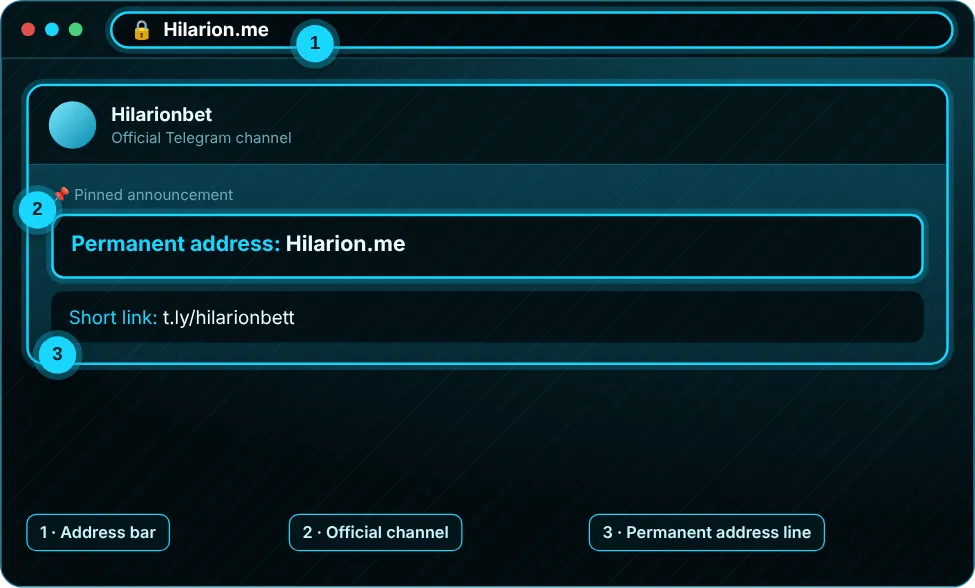
The address is renewed from time to time because of BTK access restrictions. There are three safe ways to find the current one: type Hilarion.me, open the pinned message in our notice channel, or use the short link t.ly/hilarionbett. All three should lead to the same place. If one shows a different address, ask live support before you sign in.
Checking the address bar keeps your password away from a wrong page. The domain should show a padlock; if the browser says "not secure", do not fill in the form. If a bookmark stopped opening, you may have saved an old address: delete it and save the Hilarion.me route instead. Your Hilarionbet account is not affected by any of this, and Hilarionbet deposit methods only appear after you sign in.
The most frequent mistake is trusting a link a friend sends. If a relative forwards you a "new address", they may have clicked a look-alike page themselves. Compare it with the Hilarion.me result before you click, even when you only want to open Hilarionbet crash games or the slot lobby.
Once the address is verified, a home-screen shortcut is more durable than a bookmark, because it keeps the route and not the domain. That removes the need to search again after the next renewal.
Address check
The screenshot shows the Hilarion.me line in the address bar and the pinned line in the notice channel pointing to the same domain. If both match, continue. The full checklist is on the current address page.
Filling In the Registration Form
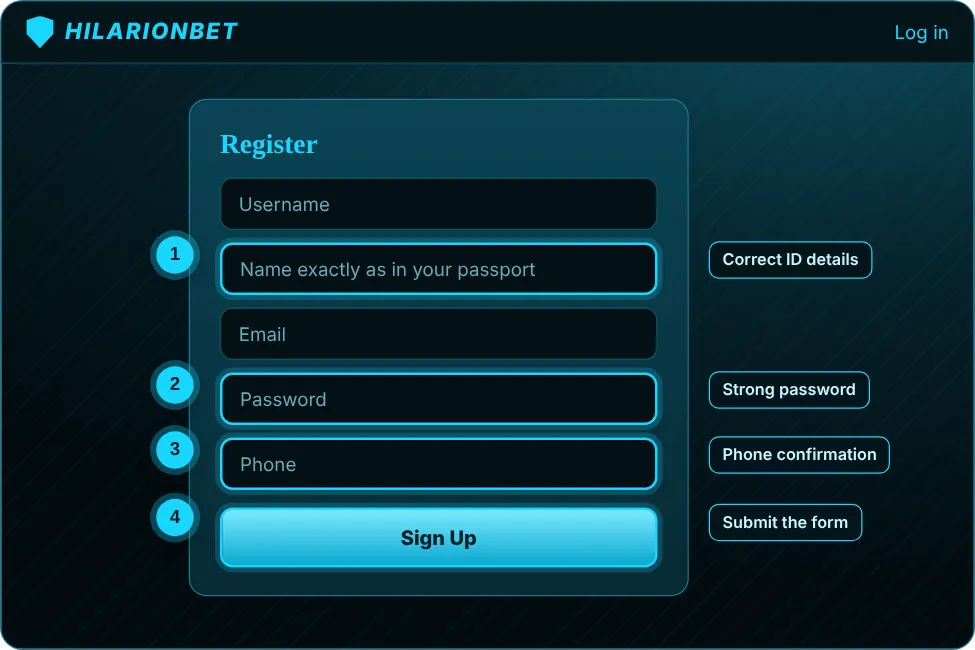
The form is short: username, password, email, phone, date of birth and the name from your ID. Follow these steps and the form is accepted at the first try. If you plan to use a Hilarionbet app download, note that none is required; the browser version holds every function.
- Reach the site through Hilarion.me and read the domain in the address bar.
- Press "Sign Up" to open the form.
- Choose a username; letters and digits are fine, avoid personal data.
- Set a strong password of at least eight characters mixing letters, digits and symbols.
- Type your email and phone exactly; verification travels through both.
- Enter your date of birth and the name exactly as on your ID.
- Send the form and type the verification code.
Registration data cannot be edited later, and wrong details cancel the 500 TL sports or 500 FS trial. After the form is accepted the account opens at once and you can choose a trial start. The odds and the lobby unlock after you sign in.
While typing, make sure nobody can watch the password field, and keep the password somewhere safe. A password manager beats a plain note on the phone. Your username will not change later, so think long term and avoid easily guessed patterns such as a birth year.
The phone number may need the country code and no leading zero; the field hint shows the expected format. If the number is wrong, the code goes to someone else, so check it once more before you send the form. Hilarionbet odds, the sports lobby and the cashier all use these same details, which is why accuracy matters at this stage.
Login with a Verification Code (2FA)
Two-step verification works when a password alone is not enough. After the password a code reaches your phone or email, and entering it opens the session. If you gave a phone number when you signed up with Hilarionbet, codes go to that number. A code lives only a few minutes; request a new one if time runs out.
Never share the code: nobody, support included, will ask you for it. If a code does not arrive, check the signal and the spam folder, then request another. Repeated requests in a short time can trigger a short wait, so pause a few minutes between tries.
The real value of 2FA is that a leaked password alone cannot open the account. Keep your own email password strong as well, because reset codes arrive there. If you lose the phone, ask live chat to update the number on the account after verifying your identity.
Closing or Freezing an Account
To freeze or close an account, contact live chat. The request is verified through the email or phone on the account. Freezing is for players who want a break; during it, sign-in is restricted and campaign rights pause. Before closing, make sure the balance is zero and there are no pending withdrawals or open slips.
If you are struggling to keep gaming under control, do not postpone: write at once. We do not try to shorten that process; the player's decision comes first. Free help is available from GambleAware and GamCare (0808 8020 133); see the responsible gaming page.
Closing an account cannot be undone; if you return, you open a new account and bonus rights are reassessed. Make this decision calmly, not after a single bad session. A freeze keeps the door open. Before a request, check for any open bonus or turnover; an unfinished campaign ends with the account, and an unfinished Hilarionbet sign up attempt does not carry over.
Password Reset and Account Recovery

If you forgot your password, use the reset link on the sign-in screen. A code goes to the registered email or phone; enter it and type the new password twice. The new password must differ from the old one, and passwords from other sites should not be reused.
If you can no longer open the registered email or your number has changed, write to live chat. We may ask for account details to verify identity, and that is a security measure. Support never asks for your password. If you received a reset email you did not request, do not click it; change your password from inside the site and report it to [email protected].
After a reset, sign out on all devices and sign in again so that old sessions end. There is no rule that you must change your password often; what matters is a long and unique one for each site. A password manager is the practical answer.
Common Login Errors
Most sign-in problems come from a few causes. The table pairs the symptom with the likely cause and the fix.
| Symptom | Likely cause | Fix |
|---|---|---|
| Page will not open | Address changed or network restriction | Type Hilarion.me, switch network |
| Password rejected | Wrong case or an old password | Reset the password |
| Code does not arrive | Signal, spam folder or wrong number | Request a new code, check the number |
| Form returns an error | Missing field or reused email | Check fields, contact support |
| Trial not credited | Account older than 01.05.2025 or a detail mismatch | Ask live chat to check |
A screenshot of the message helps the team. Do not show your password or code in it.
If your error is not in the table, copy the message word for word and describe what you were doing. "I cannot log in" gives less than "after entering the code the page reloads". Browser extensions can block forms, so turning off an ad blocker or trying another browser is a quick test.
Activating the Welcome Package
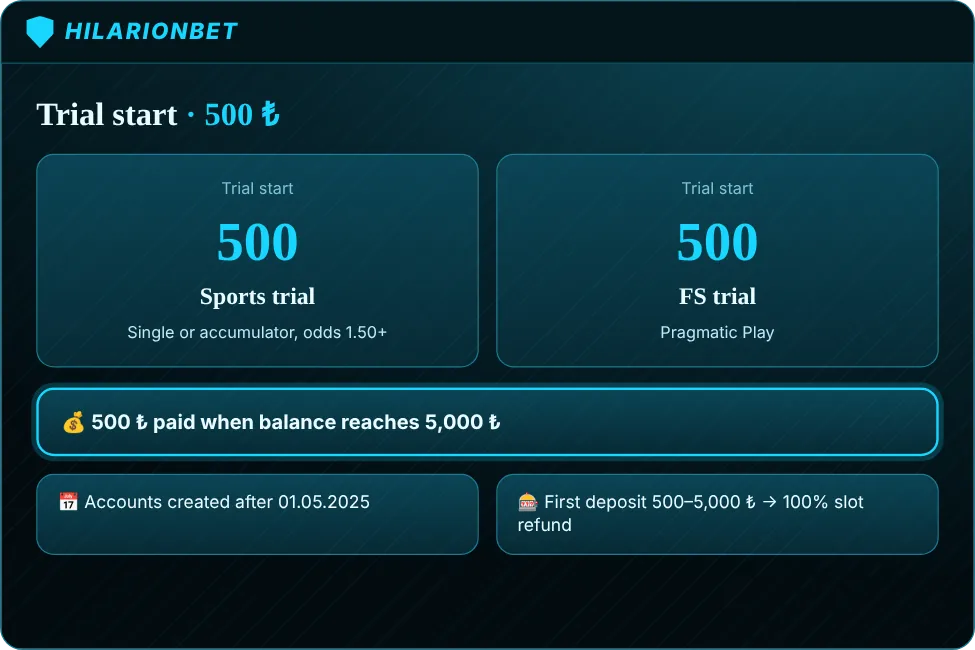
If your account was created after 01.05.2025 you can pick one of two no-deposit starts: a 500 TL sports trial or a 500 FS trial. The sports trial accepts a single or an accumulator with minimum odds of 1.50. The FS trial runs on Pragmatic Play: Gates of Olympus, Sweet Bonanza, The Dog House, Starlight Princess and Wild West Gold. In both, a fixed 500 ₺ is paid once the balance reaches 5,000 ₺.
A first deposit of 500–5,000 ₺ lost on slots returns as a 100% slot refund. The 50% slot bonus pays up to 2,500 TL with 1x turnover. Check the campaign text for crash games, live dealer tables and blackjack: not every game counts equally towards turnover. Read Bonus Requests before activating anything, and ask live chat if two offers might overlap.
With the trial in mind, the sports side's common error is ignoring the odds floor: legs below 1.50 do not count, and in an accumulator every leg must meet it. Hilarionbet live dealer tables, Hilarionbet blackjack and Hilarionbet crash games may count differently towards a bonus, so read the scope line at the top of the campaign. Hilarionbet odds for the trial slip are shown on the match card.
The fixed 500 ₺ is paid when the balance reaches 5,000 ₺; it is a campaign condition, not a target you set. Before activating, check which account status applies and that no other deposit bonus is open. Hilarionbet deposit methods and amounts for promotions (500–5,000 ₺) are listed in the cashier, and Hilarionbet live chat can confirm which method fits an offer.
KYC Identity Verification Steps
Identity verification protects the account and matters most at withdrawal. Usually we ask for a clear photo of the front and back of your ID, and sometimes proof of address or of the payment method. The name on the document must match the name you registered with.
Photos should be sharp, with all four corners visible, and the document must be valid. Uploading someone else's document leads to closure of the account. You can follow the status on your account page. Verification is not needed to browse, but deposits and withdrawals go faster on a verified account.
If more documents are requested, it is usually to make the details match, not a sign of suspicion. Send documents only through the upload area inside the site; ignore "upload your ID" links that come by email or chat. If your document has expired, upload a new one. Your Hilarionbet account is not frozen while checks are in progress unless we tell you so.
Safe Login on Desktop and Mobile
On desktop use the browser tab only for the verified address and log out on shared computers. Saving the password in the browser is convenient but should stay off on shared devices. Keep your browser and operating system updated.
On mobile, add the Hilarion.me route to the home screen. Avoid public Wi‑Fi for sign-in; mobile data is safer. Use a screen lock and, if the phone is lost, change your password from another device. For more on safety see the safety page.
A finished sign-up should make every later hilarionbet log in take seconds; if you are asked for a code every time, cookies may have been cleared. On a trusted device you may stay signed in; on a shared one, sign out. Keep antivirus and browser updates on, since they block known fake pages. If you see an action you do not recognise, change the password and tell support. A Hilarionbet app download is never needed to stay safe; the browser route is the one we maintain.
FAQ
How long does the sign up take?
The form is short and takes a few minutes; you only have to enter the verification code.
Can I change my details later?
No. Identity details cannot be changed after registration, and wrong details cancel the bonus.
I forgot my password. What now?
Use the reset link on the sign-in screen; the code goes to the registered email or phone. If you have no access, contact live chat.
Who gets the trial bonus?
Accounts created after 01.05.2025; pick a 500 TL sports trial or a 500 FS trial.
Which address should I use to log in?
Type Hilarion.me; it leads to the working domain even after a change.